
Settings
Configure API keys, appearance, language and more

Marcelo Franco
Last Update vor 5 Monaten
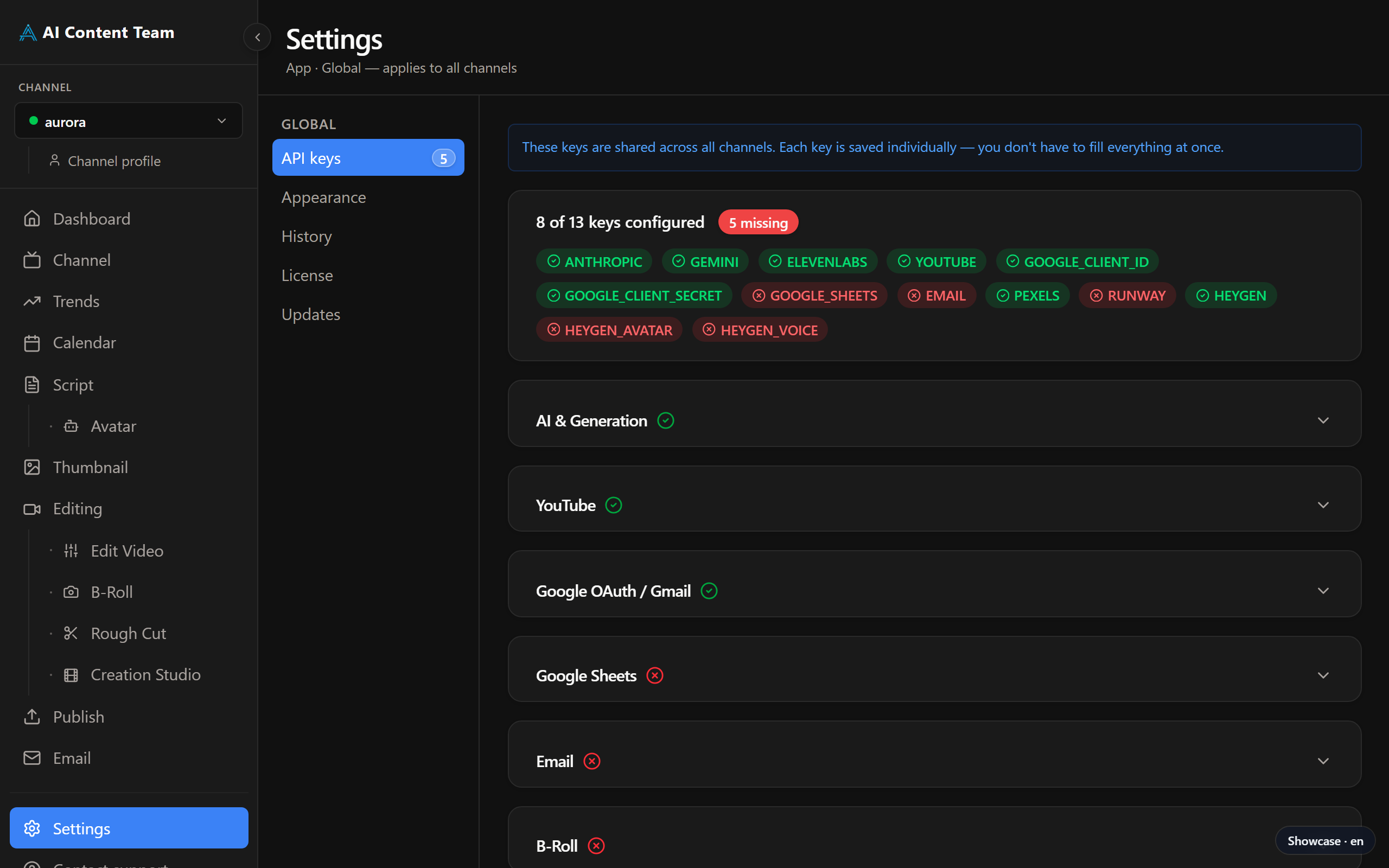
API Keys
Every external integration requires an individual API key. A progress indicator shows how many keys are configured. Services: AI & generation (ANTHROPIC_API_KEY, GEMINI_API_KEY), YouTube (YOUTUBE_API_KEY), Google OAuth (GOOGLE_CLIENT_ID, GOOGLE_CLIENT_SECRET), Google Sheets (GOOGLE_SHEETS_ID), Email (EMAIL_RECIPIENT), B-Roll (PEXELS_API_KEY, RUNWAY_API_KEY), HeyGen (HEYGEN_API_KEY, HEYGEN_AVATAR_ID, HEYGEN_VOICE_ID), ElevenLabs (ELEVENLABS_API_KEY).
Appearance
Choose between Dark, Light or System theme. Adjust the font size to your preference.
Language
Switch the app interface between English, Português and Español.
Channel Profile
A shortcut to your channel's editorial profile — name, niche, tone of voice and target audience — which guides all AI-generated content.
History
A log of every agent execution: start time, duration, status and any errors. Useful for auditing automated runs.
Updates
Check for new versions manually or enable automatic updates so the app always stays current.